Forgotten SSO ID Recovery
Losing or forgetting your SSO ID can be frustrating when you need to access the portal. The SSO ID Recovery is the only way you can regain access to your SSO account. This guide will help you recover the SSO ID in a few steps.
What is SSO ID Recovery?
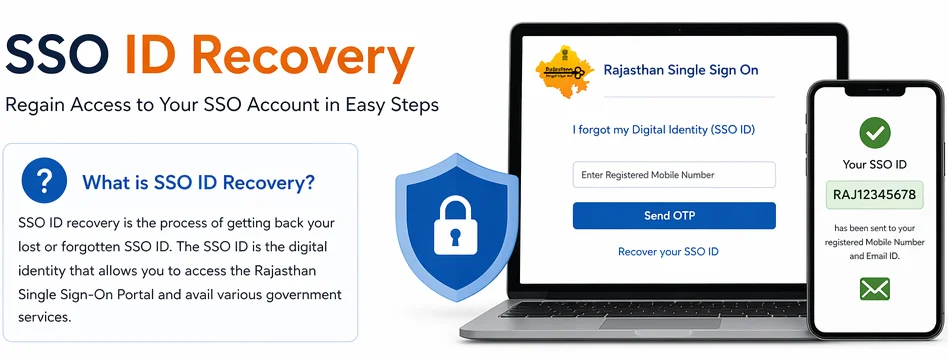
SSO ID recovery is the process of getting back your lost or forgotten SSO ID. The SSO ID is the digital identity that allows you to access the Rajasthan Single Sign-On Portal. So In order to access the state government public services, SSO ID Recovery is important to get your ID back in order to gain access to your portal.
Who Can Recover Their SSO ID?
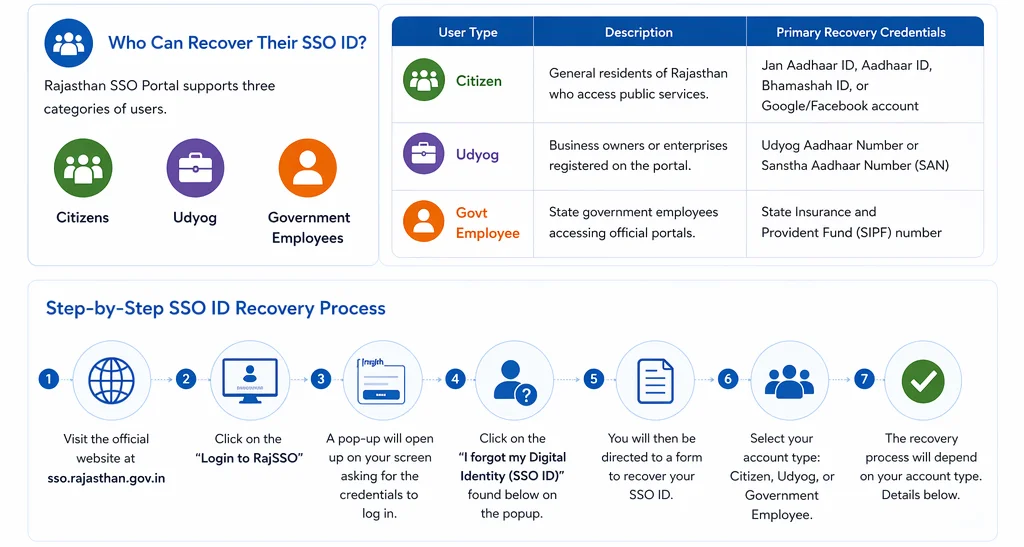
The Rajhistan SSO Portal supports the three categories of users:
- Citizens,
- Udyog
- Government Employees.
The process of receiver depend on the type of user account. This guide covers the detailed process of recovery for each category.
| User Type | Description | Primary Recovery Credentials |
| Citizen | General residents of Rajasthan who access public services. | Jan Aadhaar ID, Aadhaar ID, Bhamashah ID, or Google/Facebook account |
| Udyog | Business owners or enterprises registered on the portal. | Udyog Aadhaar Number or Sanstha Aadhaar Number (SAN) |
| Govt Employee | State government employees accessing official portals. | State Insurance and Provident Fund (SIPF) number |
Step-by-Step SSO ID Recovery Process
To recover your SSO ID, follow the steps below:
- Visit the official website at https://sso.rajasthan.gov.in/
- Click on the “Login to RajSSO”
- A pop-up will open up on your screen asking for the credentials to log in.
- Click on the “I forgot my Digital Identity (SSO ID)” found below on the popup.
- You will then be directed to a form to recover your SSO ID.
- Select whether you have an account as a Citizen, Udyog, or Government Employee.
The recovery process will depend on your account type. The process to recover the SSO ID for each account type is detailed next.
How to Recover SSO ID for Citizens
If you are a citizen user, follow the steps above.
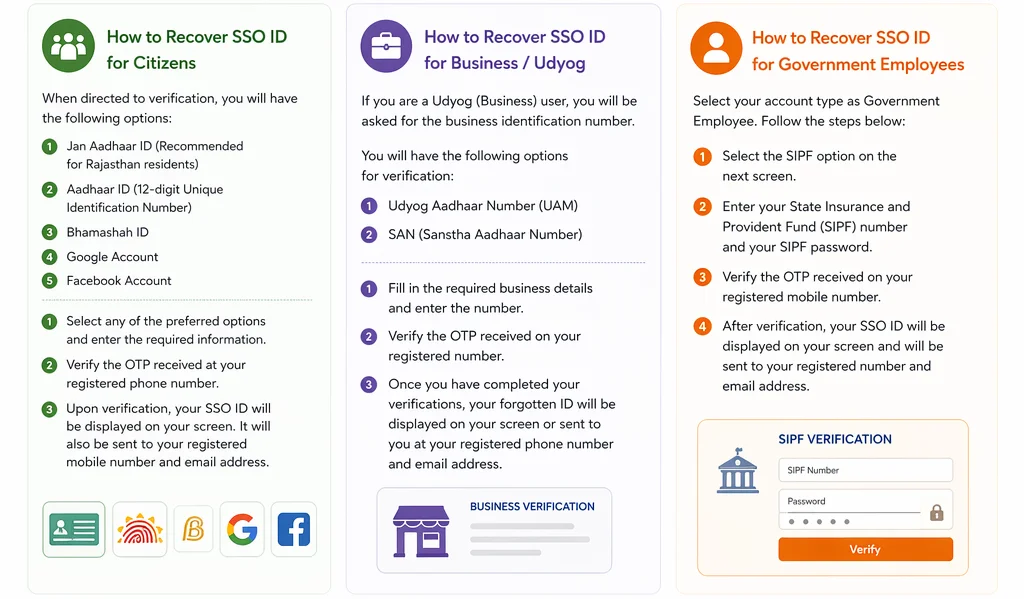
- When you are directed to the verification, you will have the following options:
- Jan Aadhaar ID (Recommended for Rajasthan residents)
- Aadhaar ID (12-digit Unique Identification Number)
- Bhamashah ID
- Google Account
- Facebook Account
- Select any of the preferred options and enter the required information.
- Verify the OTP received at your registered phone number.
Upon verification, your SSO ID will be displayed on your screen. It will also be sent to your registered mobile number and email address.
How to Recover SSO ID for Business / Udyog
If you are a user with the Udyog (Business) account, the portal will ask you for the business identification number.
- You will have the following options for verification:
- Udyog Aadhaar Number (UAM)
- SAN (Sanstha Aadhaar Number)
- Fill in the required business details and enter the number.
- Verify the OTP received on your registered number.
Once you have completed your verifications, your forgotten ID will be displayed on your screen, or it will be sent to you at your registered phone number and email address.
How to Recover SSO ID for Government Employees
Select your account type as a government employee. Once you have selected, follow the steps given below:
- Select the SIPF option on the next screen.
- Enter your State Insurance and Provident Fund (SIPF) number and your SIPF password.
- Verify the OTP received on your registered mobile number.
After verification, your SSO ID will be displayed on your screen and will be sent to your registered number and email address.
SSO ID Recover Via SMS
If you cannot use the online portal or did not receive OTP, you can recover your ID via SMS.
- Send an SMS with the text RJ SSO.
- Send the message from your registered mobile number to the toll-free number 9223166166.
- You will receive your SSO ID in response.
Note: This method only works if you have logged in to your account after September 7, 2018.
SSO ID Via Help Desk
If you are facing issues and somehow aren’t able to recover your ID you can contact the help desk for recovery. They will ask for the necessary information and will give you your forgotten or lost SSO ID. The help desk contact details are below.
- Toll-Free Helpline: 0141-5123717, 0141-5153222.
- Email Support: helpdesk.sso@rajasthan.gov.in .
- Visit e-Mitra Center: You can also visit the nearest e-Mitra center with your Aadhaar card for in-person assistance
FAQs
Conclusion
Forgetting your SSO ID can feel frustrating, especially when you need urgent access to government services. However, the recovery process is simple and designed to help you regain access quickly. Whether you are a citizen, business owner, or government employee, you can recover your SSO ID using your registered details in just a few steps. If the online method doesn’t work, options like SMS and helpdesk support ensure you’re never completely locked out. Keeping your registered mobile number and details updated will make the recovery process even smoother in the future.