Forgotten SSO ID Password Complete Guide to Reset 2026
Forgotten SSO ID password is a common issue, as user not remember their passwords for so long. This situation can be frustrating because you cannot access the SSO dashboard. If you have lost your SSO ID password, don’t worry, you can reset your SSO ID password in a few minutes with your email address, mobile number, and Aadhar card. SSO portal offers the feature of forgotten password reset to users free of charge.
The SSO ID recovery helps you recover your username, and the password recovery is for creating a new password. This guide will help you on how you can recover your SSO ID forgotten password for your citizen, udyog, and government employee accounts.
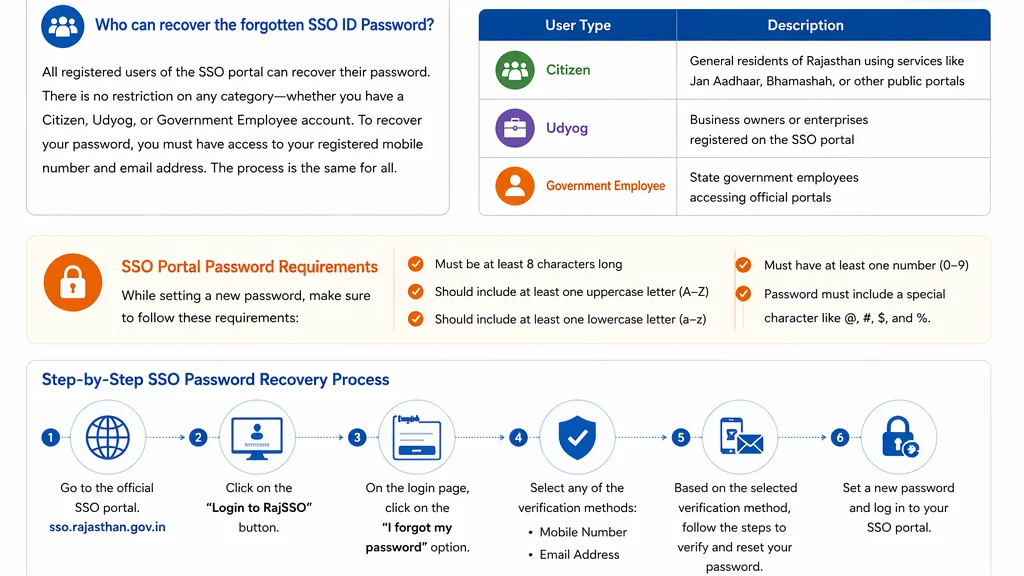
Who can recover the forgotten SSO ID Password?
All registered user of the SSO portal can recover their account by resetting the password. There is no restriction on any category; whether you have a citizen, Udyog or Government Employee account, you can recover your password. To recover your password, you must have access to your registered mobile number and email address. The process to recover the password for each category is the same.
| User Type | Description |
| Citizen | General residents of Rajasthan using services like Jan Aadhaar, Bhamashah, or other public portals |
| Udyog | Business owners or enterprises registered on the SSO portal |
| Government Employee | State government employees accessing official portals |
SSO Portal Password Requirements
The SSO Portal requires you to follow its requirements. If you don’t fulfill the requirements, the password cannot be reset. Make sure to follow the steps below while setting it.
- Must be at least 8 characters long
- Should include at least one uppercase letter (A–Z)
- Should include at least one lowercase letter (a–z)
- Must have at least one number (0–9)
- Password must include a special character like @, #, $, and %.
Step-by-Step SSO ID Password Recovery Process
To recover the SSO ID password, follow the steps below.
- Go to the official SSO portal. You can follow this link
- Click on the button “Login to RajSSO”.
- On the login page, click on the “I forgot my password” option.
- Select any of the verification methods:
- Mobile Number
- Email Address
Based on the selected verification method, the process to verify is explained below.
For forgotton single sign on ID follow our guide to recover the SSO ID.
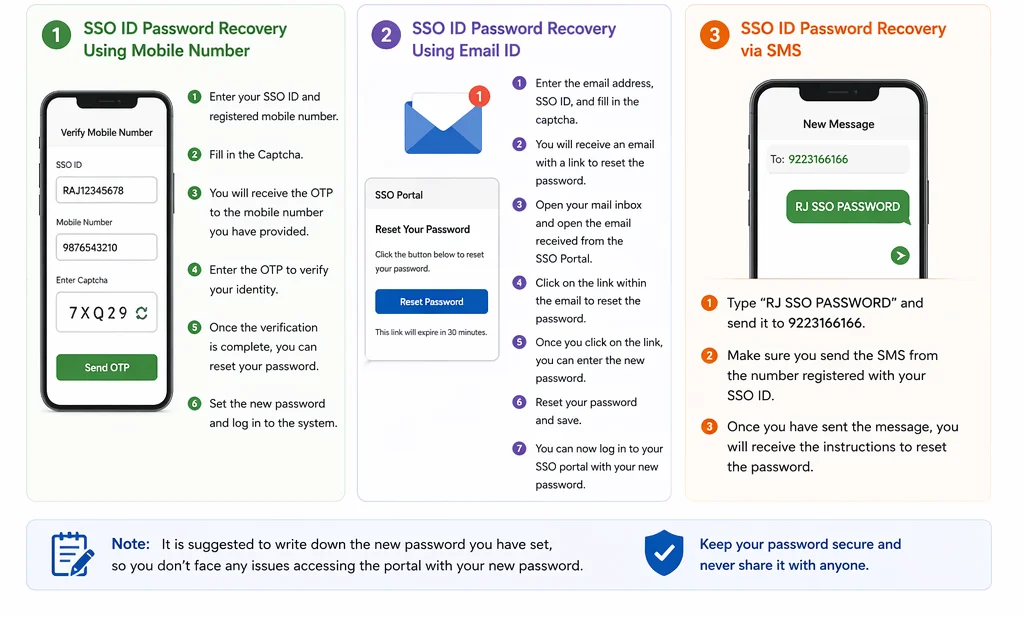
SSO ID Password Recovery Using Mobile Number
If you have selected the verification via mobile number, you will be directed to a form requesting the required information. Follow the process given below.
- Enter your SSO ID and registered mobile number.
- Fill in the Captcha.
- After entering the required information, you will receive the OTP to the mobile number you have provided.
- Enter the OTP to verify your identity.
- Once the verification is complete, you can reset your password.
- Set the new password and log in to the system.
SSO ID Password Recovery Using Email ID
If you have selected to recover the password via email, follow the steps below.
Once you have selected the verification via email, you will be directed to the form requiring the email address and necessary information.
- Enter the email address, SSO ID, and fill in the captcha.
- You will receive an email with a link to reset the password.
- Open your mail inbox and open the email received from the SSO Portal.
- Click on the link within the email to reset the password.
- Once you click on the link, you can enter the new password.
- Reset your password and save.
You can now log in to your SSO portal with your new password.
Note: It is suggested to write down the new password you have set, so you don’t face any issues accessing the portal with your new password.
SSO ID Password Recovery via SMS
If you are facing issues receiving the OTP or cannot complete the online verification. You can recover your password via SMS. Here is how you can get your password via SMS.
Type “RJ SSO PASSWORD ” and send it to 9223166166. Make sure you send the SMS from the number registered with your SSO ID.
Once you have sent the password, you will receive the instructions to reset the password.